Supported formats
TXT, Markdown, DOCX, text-layer PDFs, and data table files.
Setup, modes, automation, server deployments, and product updates.
Install, launch, download the local model, and anonymize the first document.
AutomationRun anonymization jobs from scripts or a shared server endpoint.
ReferenceHow Piixie turns detected PII into local Faker-backed names, addresses, accounts, dates, and identifiers.
DetectionWhy context-aware models catch embedded PII relationships that regex, dictionaries, and OCR-only pipelines miss.
UpdatesFollow website, desktop app, anonymization, and file support updates.
TXT, Markdown, DOCX, text-layer PDFs, and data table files.
What runs locally, where outputs go, and when external providers are optional.
Free daily usage, Pro daily local anonymizations, and team deployment options.
No matching docs found.
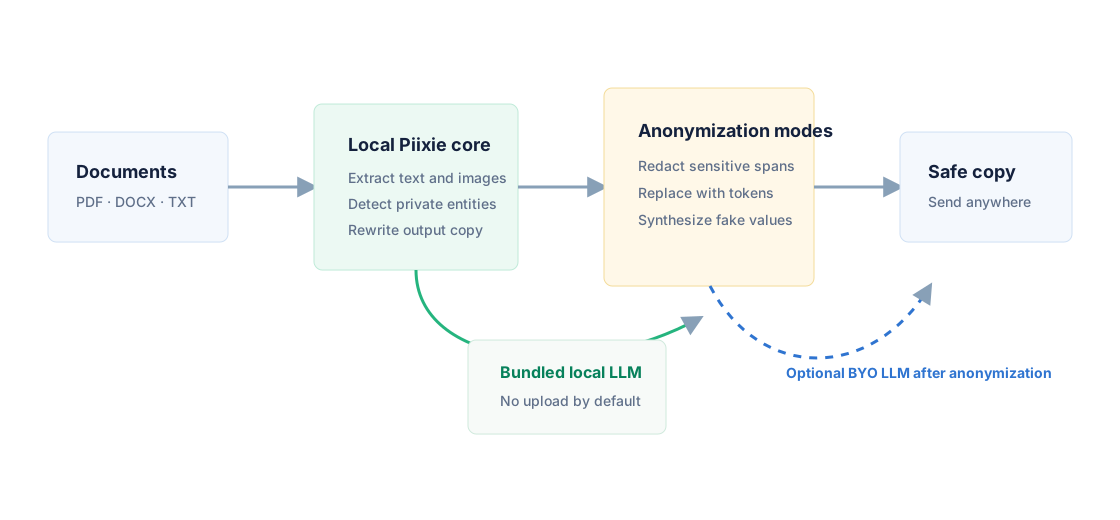
Piixie creates anonymized copies of documents. The original file stays in place, and the output copy is written to the local Piixie data directory for review and export.
PII is replaced with visible redaction markers. Use it when the output should reveal no sensitive values at all.
PII becomes stable tokens such as name and email placeholders. Use it when consistency matters during review.
PII is replaced with fake values generated locally through Piixie's bundled Faker bridge. Use it for demos, training samples, tests, and prompts that need natural-looking context.
Current desktop support covers text files, Markdown, DOCX, PDFs, and data-table files. The goal is to support every file type that needs anonymization without CGO dependencies.
PII is not always a clean token shaped like an email address, credit card number, or phone number. In real documents, private information is often implied by relationships between fields, surrounding paragraphs, tables, captions, images, and repeated references. Piixie uses a local LLM because those relationships are exactly where rule-based detection starts to break down.
A rules engine can match [email protected]. It cannot reliably decide that "the claimant", "her dependent", "the upstairs tenant", and an account row three pages later all refer to the same private person. An LLM can use context to connect those references, classify the entity, choose the right anonymization mode, and preserve consistency in the rewritten document.
Piixie runs as a server and as a CLI so privacy checks fit into existing workflows. See the automation guide for batch commands and deployment patterns.
Open automation guideLocal anonymization comes first. Teams can connect external providers after the raw document has been anonymized.
sequenceDiagram
  participant User
  participant Piixie
  participant LocalModel as Local model
  participant Provider as Optional external LLM
  User->>Piixie: Open raw document
  Piixie->>LocalModel: Detect and transform PII
  LocalModel-->>Piixie: Anonymized content
  Piixie-->>User: Safe copy
  User->>Provider: Send safe copy when needed
Piixie is local-first, not cloud-first. Extraction, model execution, and output review all happen locally. External providers are optional and only used after anonymization.